Unlocking a smartphone can feel almost instant. You look at the screen or place a finger on a sensor, and within a moment the phone gives you access. There is no need to type a PIN every time, but several hardware and software processes are working behind that simple action.
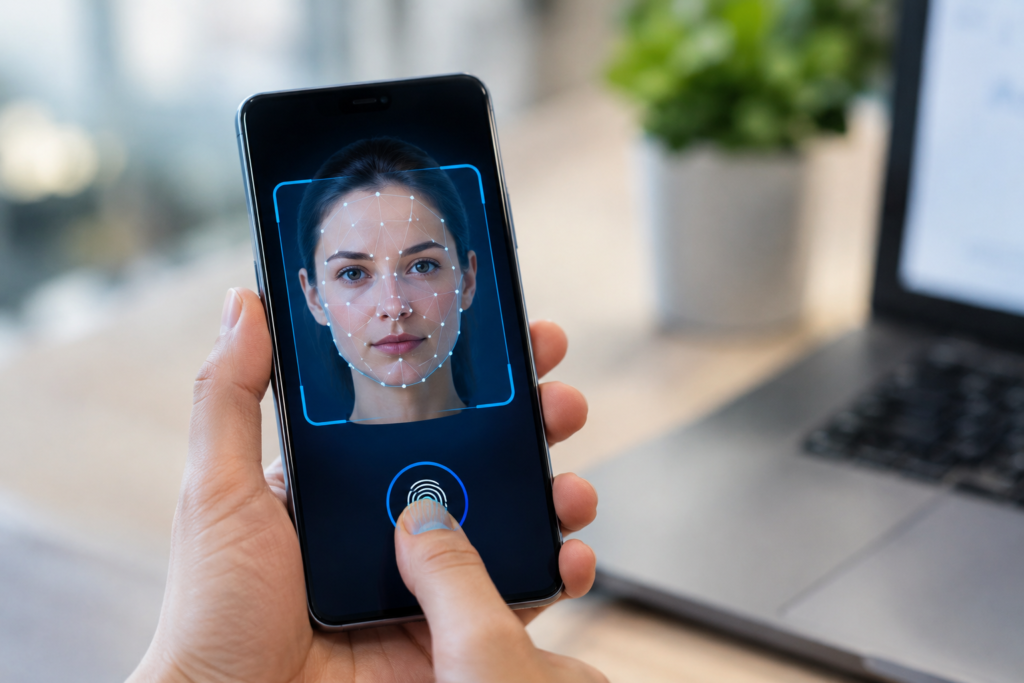
Smartphone face unlock and fingerprint sensors use different methods to recognize a person. Fingerprint systems examine patterns found on your fingertip, while face unlock systems analyze characteristics of your face. Both are designed to confirm that the person trying to access the phone matches previously enrolled biometric information.
Understanding how these technologies work also explains why they sometimes fail, why some systems are more secure than others, and why your phone may occasionally ask for a passcode instead.
What Is Biometric Authentication?
Biometric authentication is a security method that uses a physical characteristic to verify someone’s identity.
On smartphones, common biometric methods include fingerprints and facial recognition. Instead of remembering something such as a password, the user provides something physically associated with them.
When you first set up biometric unlocking, the phone records information about your fingerprint or face. That information is processed and stored in a protected form. Later, when you attempt to unlock the device, the phone compares the new biometric reading with the stored information.
The phone does not simply look for an ordinary photograph or save a normal picture of your fingerprint. Modern biometric systems use specialized processing and security hardware to handle this information.
How Smartphone Fingerprint Sensors Work
Fingerprint sensors identify the unique patterns of ridges and valleys on your fingertip.
Although fingerprints can look similar at a glance, the detailed arrangement of their patterns differs from person to person. A fingerprint sensor captures these characteristics and creates information that can be compared during authentication.
There are several types of fingerprint sensors, and they do not all work in exactly the same way.
Optical Fingerprint Sensors
Optical sensors use light to capture an image or representation of the fingerprint.
When you place your finger over the sensor, the system illuminates the fingertip and detects the pattern created by the ridges and valleys.
The captured information is then processed to determine whether it matches the enrolled fingerprint.
Optical technology is commonly associated with fingerprint readers placed under smartphone displays, although the exact implementation varies between devices.
Capacitive Fingerprint Sensors
Capacitive sensors work differently.
Instead of relying primarily on an optical image, they detect differences in electrical properties across the fingertip. The ridges and valleys of the fingerprint interact differently with the sensor, allowing it to build a representation of the fingerprint pattern.
Capacitive fingerprint readers have been widely used in smartphones, including sensors integrated into buttons or placed on the back of some devices.
Ultrasonic Fingerprint Sensors
Ultrasonic fingerprint systems use sound waves to detect the structure of a fingertip.
The sensor sends ultrasonic signals toward the finger and measures how those signals interact with the surface and underlying structures.
This approach can provide information about the fingerprint without depending entirely on visible light. It can also allow fingerprint sensing beneath certain types of displays.
The exact capabilities vary by hardware implementation.
What Happens When You Register Your Fingerprint?
When you add a fingerprint to your phone, the sensor captures information about your finger.
You are normally asked to move or reposition the finger several times. This allows the system to collect different parts and angles of the fingerprint rather than relying on a single reading.
The phone processes this information and creates a biometric representation that can later be used for comparison.
Security systems are designed so that biometric information is protected rather than treated like an ordinary photograph stored in your gallery.
When you later touch the sensor, the new reading is compared with the enrolled biometric information. If the system determines that the match is sufficiently close, the phone allows authentication.
How Face Unlock Works
Face unlock uses characteristics of your face rather than your fingerprint.
The exact technology depends heavily on the smartphone.
Some phones use a front-facing camera to analyze a user’s face. Others use additional sensors to capture depth or infrared information.
A basic camera-based system can examine features such as the relative position of the eyes, nose, mouth, and other facial characteristics.
More advanced systems can use additional information to determine the shape and depth of the face.
This difference matters because simply recognizing a face in a photograph is not the same as determining that a real three-dimensional person is standing in front of the phone.
2D and 3D Face Recognition
Not all face unlock systems provide the same level of security.
A basic 2D system primarily relies on information captured by a camera. Depending on its design, lighting conditions and presentation attacks can affect how reliably it distinguishes a real person from an image.
More sophisticated systems can use depth sensing or infrared technology.
A depth-aware system can examine the three-dimensional structure of a face rather than relying only on a conventional photograph. This can make it more difficult to fool with a simple flat image.
However, the exact security of face authentication depends on the implementation used by the manufacturer.
What Happens When You Set Up Face Unlock?
During setup, the phone captures information about your face from different angles or positions.
You may be asked to move your head or look toward the camera while the system collects the necessary information.
The phone then creates a representation of your facial characteristics for later authentication.
When you attempt to unlock the phone, its sensors capture your face again. The system analyzes the new information and compares it with the enrolled biometric data.
If the result meets the device’s authentication requirements, the phone unlocks.
The process is designed to happen quickly enough that the user experiences it as almost instantaneous.
Why Face Unlock Sometimes Fails
Face recognition can be affected by changes in the environment or in the user’s appearance.
Poor lighting can affect camera-based systems. Sunglasses, masks, hats, or other changes can also make recognition more difficult, depending on the technology.
A person may also hold the phone at an unusual angle or too far away from the sensor.
Some advanced systems are designed to handle many everyday changes, but no biometric system is guaranteed to recognize a person perfectly under every condition.
This is why smartphones normally provide another authentication method such as a PIN or password.
Why Fingerprint Unlock Sometimes Fails
Fingerprint sensors can also struggle under certain conditions.
A wet, dirty, or extremely dry finger may produce a less reliable reading. Dirt on the sensor can also interfere with detection.
The position of the finger matters as well. If only part of the enrolled fingerprint reaches the sensor, the phone may not be able to find enough matching information.
Changes to the fingertip can also affect recognition. For example, a cut, peeling skin, or temporary swelling may make the fingerprint look different to the sensor.
Re-registering a fingerprint can sometimes improve recognition if the original enrollment was incomplete, although the underlying hardware still determines the system’s capabilities.
Which Is More Secure: Face Unlock or Fingerprint?
There is no single answer that applies to every smartphone.
Security depends on the specific biometric hardware, software, sensors, implementation, and authentication policies used by the manufacturer.
A sophisticated facial recognition system that uses depth or infrared information is very different from a basic camera-based face unlock feature.
Likewise, fingerprint security depends on the quality and design of the fingerprint sensor and the phone’s secure processing system.
For particularly sensitive actions, smartphones may also require a PIN or password even when biometric unlocking is enabled.
Why Phones Sometimes Ask for a PIN or Password
You may occasionally notice that your fingerprint or face is accepted normally, but the phone suddenly requires the PIN or password.
This is intentional.
Biometric authentication is generally designed to work alongside a stronger knowledge-based credential rather than completely replace it.
A phone may require the passcode after certain security-related events, such as restarting the device or after a particular period or number of unsuccessful biometric attempts. The exact rules vary between operating systems and devices.
This protects the phone if someone attempts to repeatedly authenticate without permission.
Where Biometric Data Is Protected
Biometric information is particularly sensitive because you cannot simply change your fingerprint or face in the same way you can change a password.
Modern smartphones therefore use dedicated security mechanisms to protect biometric information.
Depending on the platform, biometric data may be handled within a protected hardware-backed security environment. The exact architecture differs between manufacturers.
Apps generally do not receive your raw fingerprint or a normal image of your face simply because you have enabled biometric unlocking. Instead, supported applications can use the operating system’s authentication framework to ask whether authentication succeeded.
This allows an app to verify that the user passed authentication without necessarily receiving the underlying biometric information.
Fingerprint and Face Unlock Beyond the Lock Screen
Biometrics are not limited to unlocking the phone.
They can also be used to confirm identity when accessing supported banking applications, password managers, payment features, and other protected services.
The application does not necessarily need to know your fingerprint or facial details. Instead, the operating system can perform the authentication and return a result to the application.
This creates a useful separation between the biometric system and the individual apps installed on the phone.
The Future of Smartphone Biometrics
Biometric authentication is likely to continue developing as smartphone hardware becomes more advanced.
Fingerprint sensors could become more accurate and more deeply integrated into displays. Face recognition may also improve as cameras, depth sensors, and processing systems become more capable.
Manufacturers may continue combining multiple security technologies rather than relying on one method alone.
The goal is to make authentication both convenient and difficult to bypass without forcing users to enter a password every time they pick up their phone.
Conclusion
Smartphone face unlock and fingerprint sensors may seem simple from the user’s perspective, but both rely on sophisticated hardware and software.
Fingerprint systems analyze the unique patterns of your fingertip using technologies such as optical, capacitive, or ultrasonic sensing. Face unlock systems examine facial characteristics, with more advanced implementations using depth or infrared information to improve recognition.
Neither technology works perfectly in every situation, and the security level depends on the specific system inside the phone.
The most important point is that biometric unlocking is not simply a camera taking a picture or a sensor checking whether something looks similar. It is a complete authentication process designed to compare biometric information while protecting it from ordinary access.
That combination of convenience, hardware security, and software processing is what allows a quick touch or glance to replace the traditional password for many everyday smartphone tasks.